
How to see opponent stats on FACEIT before the match starts
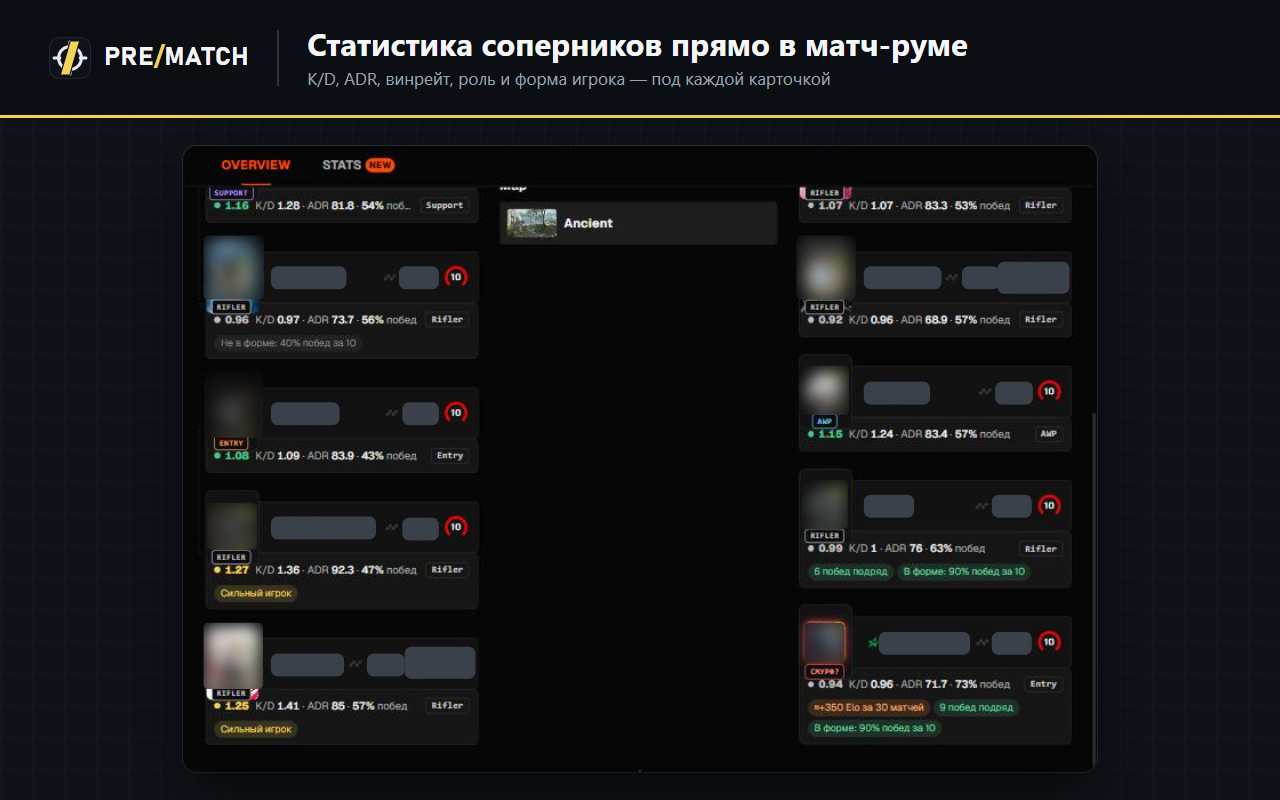
The quickest way is the free PreMatch browser extension. It adds each player’s K/D, average damage per round (ADR), win rate, form over the last 10 matches, role and per-map stats right under their card in the FACEIT match room. Nothing to set up: open a match on faceit.com and the numbers appear.
What you see for every player
- K/D and ADR over recent matches.
- Win rate and form — the streak over the last 10 games.
- Role — AWPer, entry, support, lurker or rifler, from stats compared with players of the same level.
- Maps — where they play and win most, handy for the veto.
- Smurf warning when a new account plays far above its level.
How to get it
- Install PreMatch from the Chrome Web Store (Chrome, Edge, Opera, Yandex Browser) or Firefox Add-ons.
- Open faceit.com logged in — the extension picks up your nickname.
- Find a match: stats show under the player cards, details in the PRE/MATCH panel.
Try PreMatch for free
For Chrome, Edge, Opera, Yandex Browser and Firefox. No sign-up — it works right after install.
📲 Send to another PC / remind me via Telegram
The extension installs in a desktop browser. The bot will send you the link and remind you tonight.
Questions
Is it free?
Yes, all opponent stats in PreMatch are free and need no account.
Can opponents see that I check their stats?
No. The extension reads public FACEIT data and shows it only to you.
Read next
- How to tell if a FACEIT opponent is a smurf
- FACEIT map veto: what to ban and what to pick
- Best FACEIT browser extensions in 2026
Updated: 2026-11-04